Choose the right Optimal Beam plan
Analyze beams, frames and trusses. Add steel beam design checks and section selection when you need them. Start free, then choose the plan that fits your work.
Analysis
Complete Beam and 2D analysis, saved work and reports
Starter
Complete Beam and 2D results for individual users and occasional projects.
US$9.99 billed monthly. Cancel anytime.
Choose StarterEverything in Free, plus
- Complete Beam and 2D results, including deflection, slope and stress
- 2D load cases, combinations and self-weight
- 10 saved Beam and 2D models
- 10 reusable sections with editable cloud geometry
- 10 PDF reports per month
- Commercial use and email support
- Optimal AI with 30 requests / month
- No project folders or version history
Professional
Unlimited projects, branded reports and Optimal AI for everyday engineering.
US$19.99 billed monthly. Cancel anytime.
Choose ProfessionalEverything in Starter, plus
- Unlimited saved models and reusable sections
- Unlimited PDF reports with your company logo
- Optimal AI with 100 requests / month across all tools
- Project folders, checkpoints and version history
- Priority support and early access
Analysis + Design New
Everything in Professional, plus beam design checks
Design
Check and select beam sections in Beam Calculator, with full calculation details.
US$39.99 billed monthly. Cancel anytime.
Choose DesignEverything in Professional, plus
- Bending, shear and deflection checks
- 200 AI requests / month across all tools
- Find passing sections by weight or depth
- Compare section sizes and governing checks
- Design reports with calculation details
AISC 360-22 LRFD and ASD for one uniform AISC catalog section in major-axis bending. Supported scope and benchmarks
Try Design free →3 free runs · No card needed
Free Explorer · no card needed
Learn, test and run core calculations for free. A free account adds a 7-day Professional trial.
- Determinate and indeterminate beams
- 2D frames, trusses and mixed models
- Reactions, axial, shear and moment results
- Section Builder calculations and DXF import
- 5 Optimal AI requests, then 10 / month with an account
- 3 free Design runs, no sign-up needed
All prices in USD. Applicable taxes extra. Compare all features ↓
For teams
Team
One company subscription, with Team Professional or Team Design seats.
Centralized billing, secure invitations and transferable seats for 3–50 users. Every seat in a team is the same type, and you can switch later.
- Everything in Professional or Design for every seat
- 200 AI requests per seat / month, pooled
- One company bill, by card or invoice
- Admins and members with their own sign-ins
How Team works
- Choose seats
Choose Team Professional or Team Design and how many people need access.
- Invite your team
Send secure invitations. Each person signs in with their own account.
- Manage in one place
Add, remove or reassign seats as people join or leave. Billing adjusts automatically.
Engineering Reports
Create clean Beam and 2D calculation reports
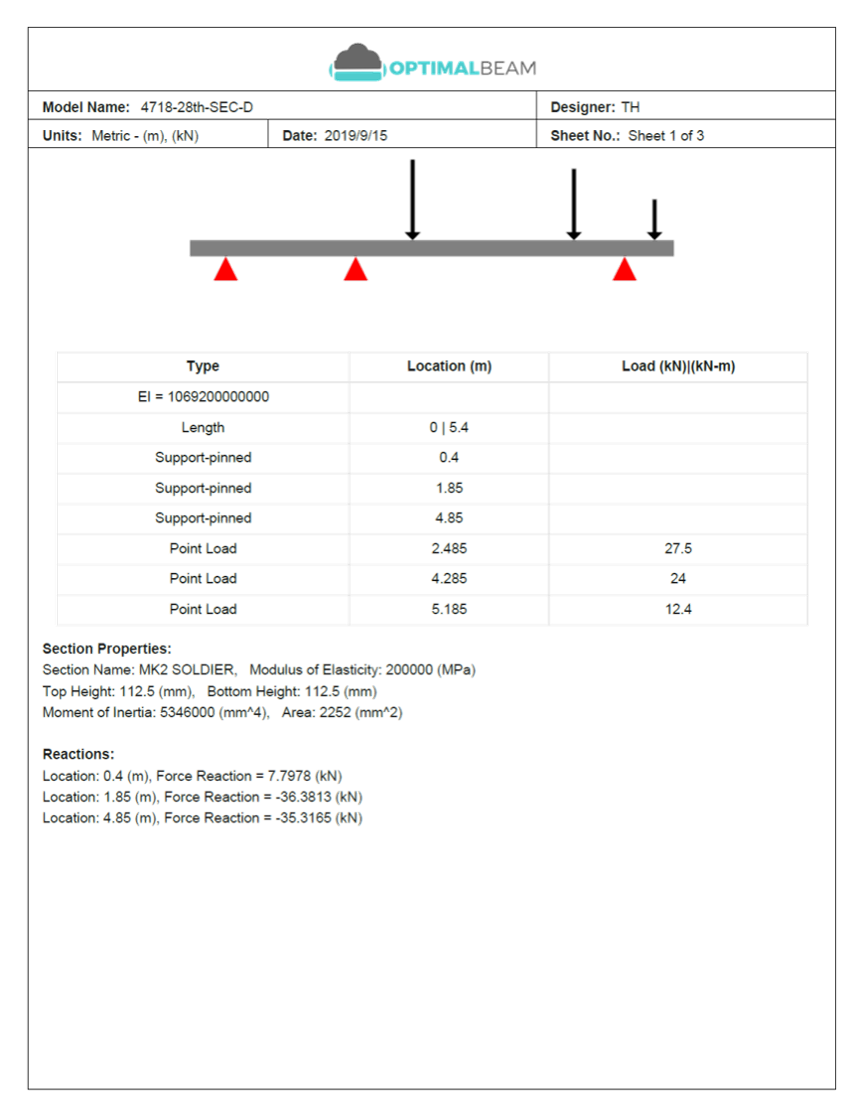
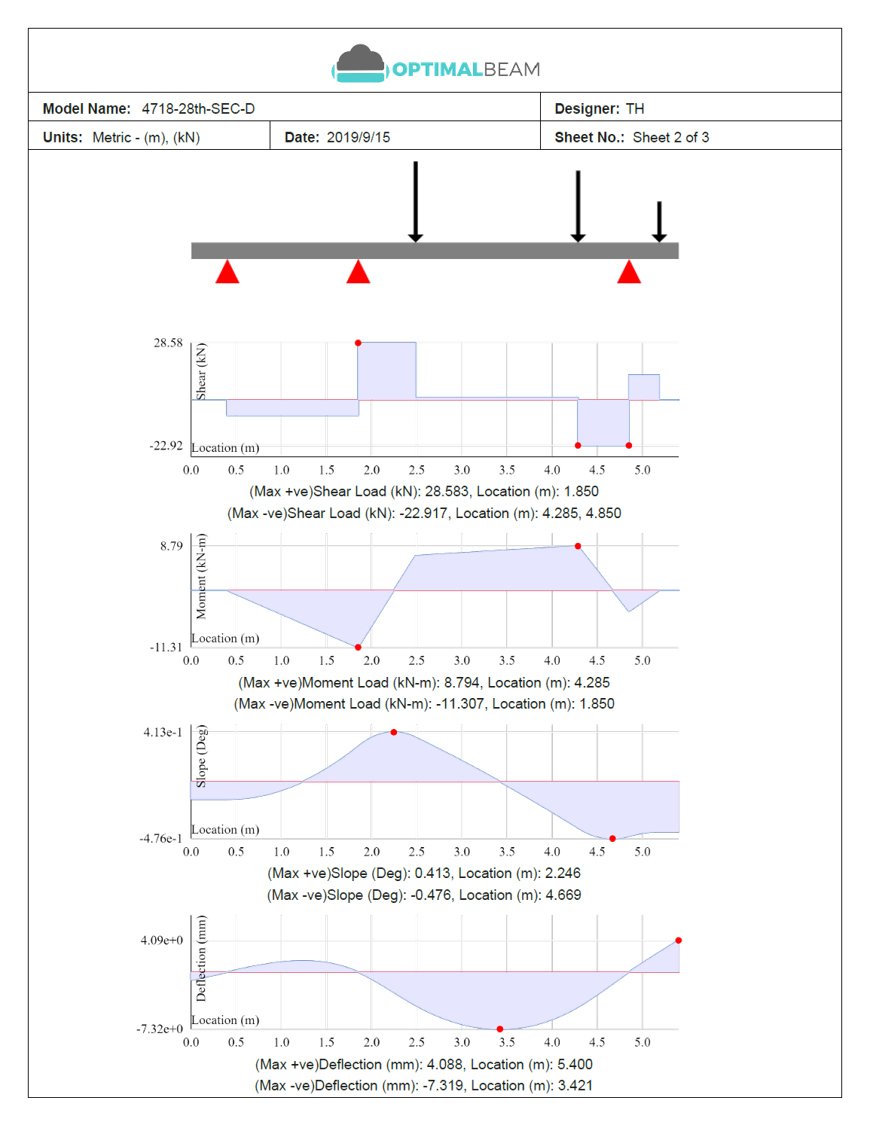
Export Beam Calculator models and 2D Structural Analysis results into clean PDF reports for review, records, and calculation packages. Beam case and combination reports identify the selected scenario and show original loads, factors, and applied values.
Starter includes 10 reports per month shared across both tools. Professional and Design remove the limit and add your company logo. Design adds beam design checks and section comparison details.
- Beam model summary
- Loads, supports, and input data
- Reaction results
- Shear, moment, slope, and deflection diagrams
- Stress and section property results
- Your company logo on Professional and Design
- Unlimited PDF reports on Professional and Design
Compare plans
Full feature comparison
Free Explorer shows access after the 7-day Professional trial. Preview means three guest Design runs or a one-time signed-in preview. Reports require a signed-in preview or a Design plan. Team subscriptions include the features of the selected seat type.
| Feature | Free Explorer | Starter | Professional | Design | Team |
|---|---|---|---|---|---|
| Beam Analysis | |||||
| Determinate and indeterminate beams | Yes | Yes | Yes | Yes | Yes |
| Multiple loads, supports and section assignments | Yes | Yes | Yes | Yes | Yes |
| Load cases and user-defined combinations | Yes | Yes | Yes | Yes | Yes |
| Reactions, shear and moment results | Yes | Yes | Yes | Yes | Yes |
| Deflection, slope and stress diagrams | No | Yes | Yes | Yes | Yes |
| Design · Beam Calculator only | |||||
| Steel beam checks to AISC 360-22: bending, shear, deflection · ASD / LRFD | Preview | Preview | Preview | Yes | Design seats |
| Find, compare and apply passing sections | Preview | Preview | Preview | Yes | Design seats |
| Design reports with calculation details | Signed-in preview | Preview | Preview | Yes | Design seats |
| 2D Structural Analysis | |||||
| Frames, trusses and mixed models | Yes | Yes | Yes | Yes | Yes |
| Multiple members, supports and ordinary loads | Yes | Yes | Yes | Yes | Yes |
| Standard and custom sections and materials | Yes | Yes | Yes | Yes | Yes |
| Reactions, axial, shear and moment results | Yes | Yes | Yes | Yes | Yes |
| Displacement results and deflected shape | No | Yes | Yes | Yes | Yes |
| Load cases, combinations and self-weight | No | Yes | Yes | Yes | Yes |
| Section Builder | |||||
| Custom section calculations and catalogue components | Yes | Yes | Yes | Yes | Yes |
| DXF import and limited AI geometry proposals | Yes | Yes | Yes | Yes | Yes |
| Reusable sections with editable cloud geometry | No | 10 | Unlimited | Unlimited | Unlimited |
| Reports & Workflow | |||||
| Beam and 2D PDF reports | No | 10 / month | Unlimited | Unlimited | Unlimited |
| Custom company logo on reports | No | No | Yes | Yes | Yes |
| Saved Beam and 2D models | No | 10 | Unlimited | Unlimited | Unlimited |
| Optimal AI for Beam and 2D modeling | Yes | Yes | Yes | Yes | Yes |
| AI requests | 10 / month (guests: 5 total) | 30 / month | 100 / month | 200 / month | 200 / seat / month, pooled |
| Project folders, checkpoints and version history | No | No | Yes | Yes | Yes |
| Commercial / Support | |||||
| Commercial use | No | Yes | Yes | Yes | Yes |
| Email support | No | Yes | Yes | Yes | Yes |
| Priority support | No | No | Yes | Yes | Yes |
| Team management and transferable seats | No | No | No | No | Yes |
| Centralized company billing | No | No | No | No | Yes |
Try it free
Try Beam, 2D Analysis, and Section Builder first
Calculate custom sections for free, use Beam or 2D Analysis for core modeling and force results, or create a free account for a 7-day Professional trial. Try three Design runs as a guest or sign in for a Design preview.
Simple, flexible subscriptions
-
Cancel anytime
No long-term lock-in. Manage or cancel your subscription whenever you need.
-
No hidden fees
Review your price and any applicable taxes before confirming. Design previews end automatically.
-
Secure account and saved model storage
We take steps to protect your account information and saved project data.
-
Email support included
Reach our team by email on every paid plan.
-
Upgrade when your workflow grows
Move from Starter to Professional as your work grows. Add Design when you need beam design checks and section selection. Existing customers keep their current plan unless they choose to switch.
Frequently asked questions
What is the difference between Analysis and Design?
The Analysis plans, Starter and Professional, cover Beam and 2D analysis. Professional gives you complete Beam and 2D results, unlimited saved models and reports, your company logo and Optimal AI. Design includes all of Professional and adds design checks and section selection in Beam Calculator, starting with steel beams to AISC 360-22: check a section, find passing sections, compare options and export the calculation details.
What happens to my existing subscription?
Your subscription keeps its current price and renewal terms until you confirm a change. Open Settings to compare plans, or choose an upgrade from this page. Stripe shows the new terms and any charge or credit before you confirm.
How does the Design preview work?
Guests can complete three design runs. Each successful section check or section search uses one run; invalid requests and failed calculations do not. Free and new individual Professional accounts get a one-time 7-day preview. Starter, legacy Professional and Team accounts with analysis access get 30 days. The countdown starts after your first successful check or section search. The preview requires no card and ends automatically.
What does Design cover today?
Beam Calculator checks one uniform section from the AISC catalog over the full beam in major-axis bending. AISC 360-22 LRFD and ASD checks cover bending and shear. Live- and total-load deflection checks use the project limits you enter. Supported families include W, S, M and HP shapes with compact webs, compact C and MC channels, rectangular, square and round HSS, and pipe. Connections, bearing and web crippling, bracing adequacy, axial force and torsion require separate checks. A passing result applies to the checks shown.
Can I keep using the free calculators?
Yes. Core Beam and 2D modeling, reactions and force diagrams, and Section Builder calculations stay free. A new free account includes a 7-day Professional trial. After that, cloud saving, PDF reports and complete diagrams require a paid plan, and Optimal AI continues with 10 requests a month.
Are reports, saved models and Optimal AI included?
Starter includes 10 saved models, 10 reusable sections, 10 PDF reports and 30 Optimal AI requests per month. Professional removes the model, section and report limits, adds your company logo, project folders and version history, and includes more Optimal AI requests for Beam and 2D model setup and editing. Design includes those features plus beam design check and section comparison reports.
What happens to saved work if I cancel?
Your saved projects and sections stay associated with your account and can still be listed and opened. New cloud saves and revisions require an active paid plan. You can download 2D project source as JSON.
Do you offer Team or Enterprise options?
Yes. Team gives 3–50 people one company subscription with shared billing, secure invitations and transferable seats. Choose Team Professional at US$19.99/user/month (US$199.90/user/year) or Team Design at US$39.99/user/month (US$399.90/user/year). Every seat in a team is the same type. Existing Team subscriptions keep their current terms until an admin confirms a change. Contact us for larger teams, invoicing or custom terms.
How do AI allowances work?
Optimal AI for Beam and 2D modeling is available on every plan. Without an account you can make 5 requests in total; they do not renew. After the trial, a free account includes 10 requests per month, Starter 30, Professional 100 and Design 200. Every Team seat includes 200, pooled across the team: three seats share 600 requests. A request counts only when Optimal AI completes a reply. Section Builder geometry proposals have their own limits.
Does this change AI access on my existing plan?
The advertised AI allowances apply to existing and new accounts alike. Starter includes 30 requests per month. Professional, including legacy Pro subscriptions and Professional trials, includes 100. Every Team seat includes 200, pooled across the team, including existing Team subscriptions. Allowances reset on the first of each month at 00:00 UTC. Your subscription price and billing cycle stay the same. Design includes 200 requests per month. A Design preview leaves your current subscription and AI allowance in place.
How does yearly billing work?
Every annual plan costs the same as ten monthly payments. The full annual amount is billed upfront. Team yearly totals use the annual price per seat times your number of seats.
Can I cancel or change plans?
Yes. Manage your subscription through Settings. Stripe shows the price and any billing adjustment before you confirm a change. Canceling keeps your paid access until the end of the paid period. Existing annual plans keep their billing cycle unless you choose a different plan.
Enterprise
Talk to Sales about Enterprise
Need more than 50 seats, invoice or purchase-order billing, onboarding help, or custom terms? Send us a few details and we'll reply within two business days.